
Installer & auto-updater
The two packages (fx-folder and utils) are just files. Files sitting in an
installation directory and a profile never change on their own. These two small tools close
that gap: one puts the files in place, the other keeps them current. Neither runs in the
background and neither phones anywhere except the published release artifacts.
The installer
Section titled “The installer”A tiny native app, one per OS (installer_win.exe, installer_linux /
installer_linux_aarch64, installer_mac). It is a one-shot setup tool:
- It finds your running Firefox-family browsers (detection scans processes and lock files, so the browser must be running).
- It opens an install screen in a browser tab where you pick the browser and the components (configuration files and/or utils).
- It copies the files into place. The only step that can ask for a single elevation prompt, via a checksum-verified helper, when the target directory is admin-protected.
When it finishes there is nothing left behind: no background process, no scheduled task. You can delete the downloaded executable. Step-by-step instructions live in Installation.
The auto-updater
Section titled “The auto-updater”The updater is a small privileged script that ships inside the utils package, so it only
exists once the scripts are installed, and it goes away with them if you remove the scripts.
- Daily check. Once a day it compares a SHA-256 manifest of the published files against what you have installed.
- Notification tab. When an update is available it opens a tab showing what would change. Install it there, skip it for the day, or permanently ignore that specific update.
- In-tab install. Applying an update copies the new packages into place from inside the browser. No installer download needed. Configuration-file updates ask for the same single elevation as the installer.
- Manual update. Open it any time from the browser menu, or grab the zips from the Download page.
- Am I current? Both the updater tab and the installer show the same per-package dates and status: next to each package's manual-download link is the date of the currently published package, and Up to date means your installed copy matches it.
What it deliberately does not do: update your extensions. It notifies about new versions
of the firefox-scripts packages only. Extensions update through their own mechanism (check
about:addons), and whether an extension survives a browser update is up to its author.
Update choices
Section titled “Update choices”When the updater tab opens for a pending update, each package shows its own status badge, and three actions are available: install the update, Remind me Tomorrow, or tick Don't show again for this update next to a package to ignore that one published version.
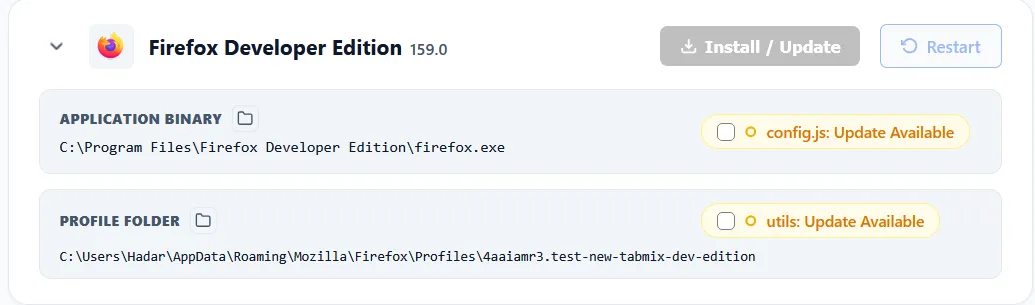
The tab remembers these through five preferences under extensions.firefox-scripts, all managed
by the updater itself:
| Preference | Set by | Meaning |
|---|---|---|
lastScriptsCheckDate |
the updater, once a day | the last day the updater acted. Either a check found everything up to date, or the tab was shown. This single date is the daily gate: nothing reopens until tomorrow. |
skippedHash.<package> |
the Don't show again checkbox | the published hash that was ignored (config or utils). A newer published hash clears it, so the next update is offered again. Clearing it in about:config re-offers the ignored update. |
activeChannel |
the updater, on channel migration | stable, dev or local. Records which release channel this install follows, so a dev install whose branch is gone migrates to stable instead of stranding. |
activeChannelBuild |
the updater, on channel migration | the dev-build branch the migration belonged to, so a different dev build never inherits it. |
override.<key> |
you, by hand (developers and tests) | overrides one generated config URL (for example the updater UI or helper host) without editing the hashed config file. Empty by default. Leave it alone unless you are testing a local snapshot. |